๐ŸŽ‰ v2.0.0 Released - Now with Autocomplete & API Docs

Premiere Pro Console

A powerful ExtendScript development environment for Adobe Premiere Pro with intelligent autocomplete, 40+ code snippets, and comprehensive API documentation.

7+
GitHub Stars
2
Versions
15
Languages
40+
Code Snippets
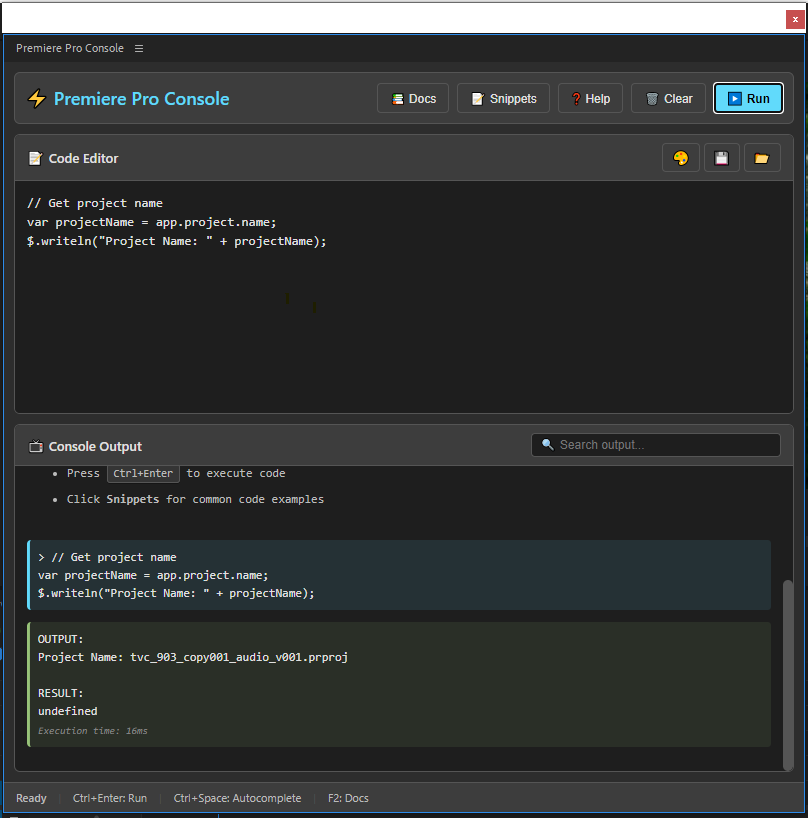
Premiere Pro Console Screenshot

Powerful Features

Everything you need for efficient ExtendScript development

๐ŸŽฏ

Intelligent Autocomplete

Smart code completion with context-aware API suggestions as you type. Navigate with arrow keys, accept with Enter/Tab.

Ctrl+Space
๐Ÿ“

Code Snippets Library

40+ pre-written examples for common tasks including project management, sequences, markers, and exports.

Ctrl+Shift+P
๐Ÿ“š

API Documentation

Complete searchable reference for all Premiere Pro ExtendScript objects, methods, and properties built-in.

F2
๐Ÿ’พ

Code Persistence

Automatic code saving between sessions with manual save/load functionality (Ctrl+S / Ctrl+O).

Auto-save
๐Ÿ”

Console Search

Real-time search through console output to quickly find specific execution results and filter by keywords.

Live Filter
๐ŸŒ

15 Languages

Full multilingual support including English, Arabic, Spanish, Chinese, French, German, Japanese, and more.

i18n

Choose Your Version

Select the version that best fits your workflow

๐Ÿš€

v1.0.0

Classic Release

65 KB
  • โšก Basic code execution
  • ๐Ÿ“บ Simple console output
  • ๐ŸŽน Keyboard shortcuts
  • ๐Ÿงน Clean interface
  • ๐Ÿชถ Lightweight

Feature Comparison

Feature v1.0.0 v2.0.0
Execute ExtendScript Code โœ… โœ…
Console Output โœ… โœ…
Keyboard Shortcuts โœ… โœ…
Intelligent Autocomplete โŒ โœ…
Code Snippets Library โŒ โœ…
API Documentation โŒ โœ…
Multilingual Support โŒ โœ…
Code Save/Load โŒ โœ…
Console Search โŒ โœ…

Installation Guide

Get started in just a few minutes

โšก

Quick Install (Recommended)

1

Download ZXP File

Download the .zxp file from the download section above

2

Install Extension Manager

Download and install Anastasiy's Extension Manager

3

Install Extension

Launch Extension Manager, click "Install" and select your downloaded .zxp file

4

Restart Premiere Pro

Restart Adobe Premiere Pro and access via Window > Extensions > Premiere Console

๐Ÿ› ๏ธ

Manual Installation

1

Enable Debug Mode

  1. Create a text file with content: 1
  2. Save as PlayerDebugMode.txt in:
    %appdata%\Adobe\CSXS\10\
  3. Create the folder if it doesn't exist
  1. Open Terminal
  2. Run command:
    defaults write com.adobe.CSXS.10 PlayerDebugMode 1
2

Download Source

Download the ZIP file from the download section and extract it

3

Copy to Extensions Folder

Copy to:
C:\Users\[USERNAME]\AppData\Roaming\Adobe\CEP\extensions\

Copy to:
~/Library/Application Support/Adobe/CEP/extensions/

4

Restart Premiere Pro

Restart Adobe Premiere Pro and access via Window > Extensions > Premiere Console

How to Use

Master the console in minutes

01

Write Code

Type your ExtendScript code in the editor. Use autocomplete (Ctrl+Space) for API suggestions.

02

Execute

Press Ctrl+Enter or click the Run button to execute your code in Premiere Pro.

03

View Results

Check the console output below for results, errors, and execution time.

Keyboard Shortcuts

Ctrl + Enter Execute code
Ctrl + Space Autocomplete
Ctrl + Shift + P Open snippets
Ctrl + S Save code
Ctrl + O Load code
F1 Show help
F2 API docs
Esc Close panel

Code Examples

Get started with these practical examples

Get Project Info

// Get current project details
$.writeln("Project: " + app.project.name);
$.writeln("Path: " + app.project.path);
$.writeln("Sequences: " + app.project.sequences.numSequences);

List Sequence Markers

// Get all markers in active sequence
var markers = app.project.activeSequence.markers;
var marker = markers.getFirstMarker();
while (marker) {
    $.writeln(marker.name + " at " + marker.start.seconds + "s");
    marker = markers.getNextMarker(marker);
}

List All Clips

// List all clips on video tracks
var tracks = app.project.activeSequence.videoTracks;
for (var i = 0; i < tracks.numTracks; i++) {
    var track = tracks[i];
    $.writeln("Track " + (i+1) + ": " + track.clips.numItems + " clips");
}

Create Markers

// Create markers at specified times
var times = [5.0, 10.0, 15.0, 20.0];
var markers = app.project.activeSequence.markers;
for (var i = 0; i < times.length; i++) {
    var marker = markers.createMarker(times[i]);
    marker.name = "Chapter " + (i + 1);
}

Frequently Asked Questions

Common questions and solutions

Make sure you've enabled debug mode and restarted Premiere Pro completely. Check if the extension is in the correct CEP extensions folder.

Choose v2.0.0 for the full experience with autocomplete, snippets, and API docs. Choose v1.0.0 if you want a minimal, lightweight console.

Try manually triggering with Ctrl+Space. Make sure you're typing valid object paths (e.g., app.project.). Check browser console (F12) for errors.

The extension is compatible with Adobe Premiere Pro CC 2018 and later versions on both Windows and macOS.

Visit our GitHub Issues page to report bugs or request features. Contributions are welcome!